

Magic365 Casino App Canada Review
If you want a quick answer: the Magic365 Casino app looks built for convenience, but you should still treat it like any other casino mobile product and check the details before you deposit. For Canadian players, the big selling points are simple access, a mobile-friendly layout, and the ability to manage your account while playing on the go. The official Magic365 pages also promote a seamless mobile experience, app support, and fast registration from a smartphone.
This page focuses on what matters most for the app experience: how it works, what you can do on mobile, where users may hit limits, and what to verify before using it regularly.
Is there a Magic365 Casino app?
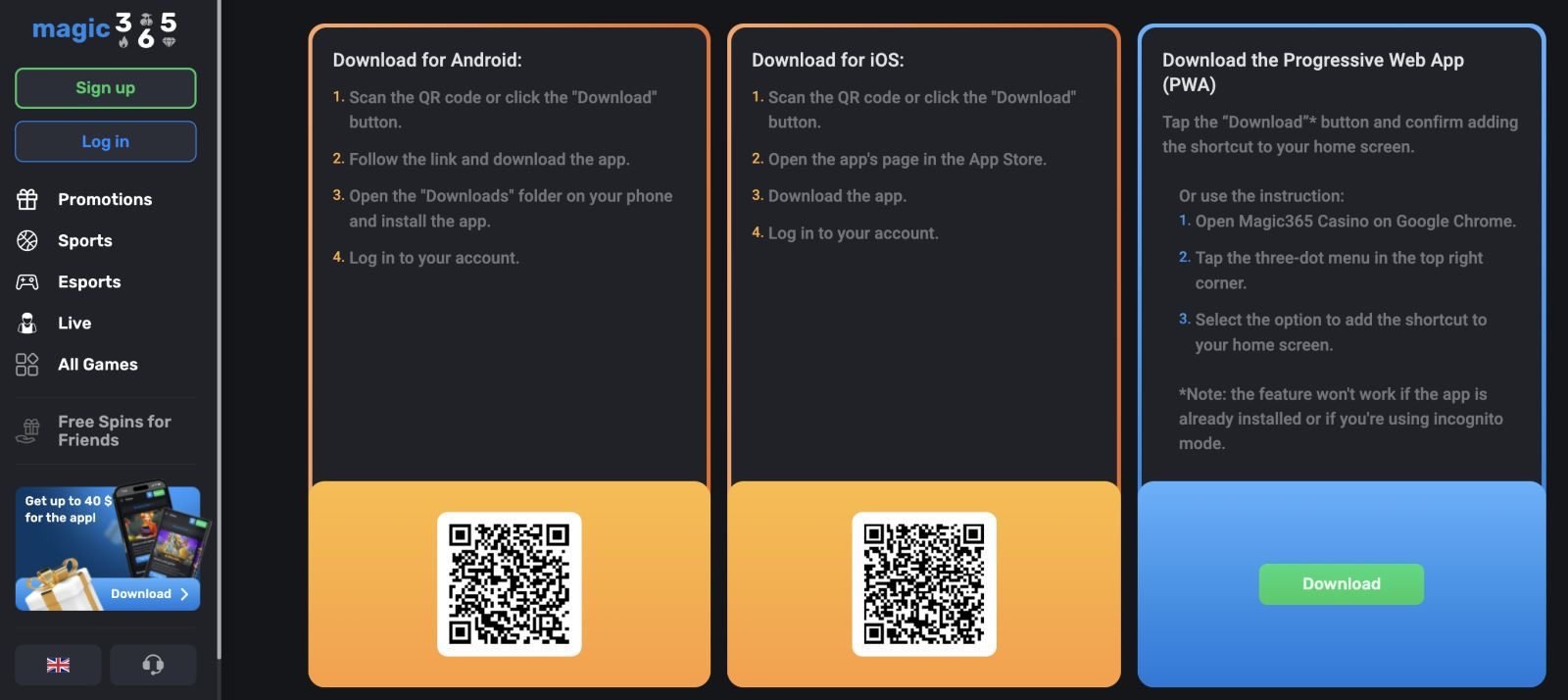
Yes — Magic365’s official pages reference both mobile browser access and a mobile app. On the main site, mobile support is described as including a downloadable app and mobile browser optimization. On the registration page, Magic365 also says players can register through their mobile browser or app.
A third-party Canadian review (Bojoko) also states the app is available for iOS and Android and supports core account actions like games, bonuses, deposits, and withdrawals. That same review notes the mobile version is usable but may feel more limited than desktop in some advanced search and filtering features.

What you can do in the Magic365 app
Based on the official site and review coverage, the app/mobile version is designed to handle the same core actions most players need:
- browse the game lobby
- claim or view promotions
- make a deposit
- request a withdrawal
- manage your account
- contact support
Magic365’s official content highlights a large game library, mobile convenience, and a “user-friendly interface,” while the registration page emphasizes fast load times and responsive forms on smartphones.
That makes the app a practical option for short sessions, quick account checks, and bonus follow-ups without needing to open the desktop site.
App vs mobile browser
This is the part many players skip, but it matters.
Magic365 promotes both an app and mobile browser play, so you are not forced to install anything to use the site on a phone. The official wording specifically mentions both app and browser access.
For most users, the best option depends on habits:
- Use the app if you want faster repeat access and a more “one-tap” experience.
- Use the mobile browser if you prefer not to install casino apps or want to compare terms on a bigger screen first.
Bojoko’s review suggests the mobile experience is solid overall, but not always as smooth as desktop for advanced filtering and navigation. That is common for newer casino apps, so it is a useful point to test yourself before making a larger deposit.
Mobile games and performance
Magic365’s official site strongly pushes the size of its game catalog and its mobile-first feel. It advertises a large library (2,000+ games in official marketing text) and specifically mentions live dealer and crash games, plus mobile play that works “anywhere, anytime.”
For app users, the key performance checks are simple:
- how quickly games load
- whether the lobby is easy to navigate
- if the cashier works smoothly
- whether live games run without lag on your connection
The official site claims a seamless mobile experience, but your real result depends on your device, internet speed, and whether you are using the app or browser version.
Deposits and withdrawals in the app
One of the most important questions: can you handle banking from mobile?
According to Bojoko’s Magic365 review, the app/mobile version supports deposits and withdrawals, and the casino’s mobile flow gives full access to key features. Bojoko also reports that account verification is required before withdrawals and gives estimated withdrawal timing averages (typically 1–2 working days overall, depending on method).
The official Magic365 pages also promote fast withdrawals, secure transactions, and crypto payment options in some sections, while emphasizing SSL security and mobile convenience.
Before using the app for payments, do this first:
- Check which methods are available in your account cashier
- Confirm whether your preferred method supports withdrawals (not just deposits)
- Complete KYC early if possible
- Read bonus terms before playing with bonus funds
This is especially important because mobile use is fast by design, and players often deposit before checking the fine print.
Safety and account checks on mobile
Magic365’s official pages mention SSL encryption, KYC, and a Curaçao licensing setup, and they reference responsible gambling content in the footer/site structure. The registration page also states that identity review may require documents like ID or utility bills.
For app users in Canada, the safest approach is:
- use the official site/app only
- avoid logging in from random links
- keep your personal details accurate
- verify your account before requesting a withdrawal
If your login, payment account, and verification details match from the start, the app experience is usually smoother later when you need support or a payout review.
Final verdict on the Magic365 app
The Magic365 Casino app looks like a useful option for Canadian players who want quick access, mobile play, and account management without opening a desktop browser every time. The official site clearly supports mobile-first use and references both app and browser play.
The main thing to remember is that convenience should not replace checks. Test the app with basic actions first (login, lobby, cashier, support), then confirm your payment and bonus terms before you commit. If those core steps feel smooth, the app can work well for regular play.
FAQ About the Magic365 Casino App
Is there a Magic365 Casino app for Canada?
Yes. Magic365’s official pages reference a mobile app and mobile browser play, and Canadian review coverage also describes a dedicated app experience.
Is the Magic365 app available for iPhone and Android?
A Canadian review (Bojoko) says the app is available for both iOS and Android. The official site confirms app/mobile support but does not clearly list device stores on the main page.
Can I deposit and withdraw using the app?
Yes, review coverage says the mobile app supports deposits and withdrawals. The official site also promotes mobile access and fast withdrawals messaging.
Can I deposit and withdraw using the app?
Yes, review coverage says the mobile app supports deposits and withdrawals. The official site also promotes mobile access and fast withdrawals messaging.
Is the app better than the mobile browser version?
It depends on your preference. Magic365 supports both. Some players prefer the app for speed, while others prefer the browser for easier reading and comparisons.
Do I need verification before withdrawing in the app?
Yes, verification (KYC) can affect withdrawals. The registration page and independent reviews both mention identity checks and document verification.
Is the Magic365 app safe to use?
Magic365 promotes SSL encryption and account verification, but players should still verify they are using the official site/app and complete account checks early.